How an AI Voice Agent Connects to Lofty, kvCORE/BoldTrail, or CINC
How an AI voice agent connects to real estate CRMs like Lofty, kvCORE/BoldTrail, and CINC, from the new-lead trigger to the notes written back.
On this page
Quick answer: An AI voice agent connects to a real estate CRM in two directions. The CRM tells the agent when a new lead arrives, and the agent writes the call result back to the contact. VerbaCall has live connections to Lofty, kvCORE/BoldTrail, CINC, Cloze, and Follow Up Boss. Before going live, switch off any CRM automation that would contact the same lead at the same moment.
Key takeaways
- Every CRM connection does two jobs: start a call when a lead arrives and write the outcome back.
- Your CRM may include its own assistant. Ask whether it places phone calls or works by text and email.
- Decide which system owns first contact, or a lead may get a CRM text and an AI call in the same minute.
- Connect with an admin account and test with your own number before real leads flow.
How does an AI voice agent talk to a CRM?
The two talk through a short loop that repeats for every lead. The details differ by CRM, but the shape is the same everywhere.
- A lead is created in the CRM From a portal, your website, an ad form, or a manual entry.
- The CRM notifies the voice agent Usually within seconds, with the contact’s name, number, and source.
- The agent places the call It follows the campaign you set: the questions to ask and the goal, such as a booked showing.
- The result is written back A call log and summary land on the contact, and the stage changes if the call earned it.
The reason to wire this up is speed. In a Harvard Business Review audit, companies that called within an hour were nearly seven times as likely to qualify a lead as those that waited an hour longer. (Harvard Business Review) A connected agent turns that hour into seconds. With VerbaCall, the call goes out about 20 seconds after the lead arrives.
What gets written back to the CRM?
Enough for a person to take over without asking the lead to repeat themselves.
| What is written | Where it lands | Why it matters |
|---|---|---|
| Call log | Contact timeline | Shows the attempt happened, and when |
| Summary of the conversation | Contact notes | Timeline and financing at a glance |
| Stage or status change | Pipeline | Moves booked leads out of the new-lead pile |
| Appointment | Your connected calendar | Blocks the time and sends the confirmation |
| Opt-out | Do-not-contact list | Stops further calls and messages |
Our guide to call summaries in a CRM shows what a good note contains.
VerbaCall connects to Lofty, kvCORE/BoldTrail, CINC, Cloze, and Follow Up Boss, and adds connectors on request. See it for realtors
What should you know about each CRM?
Lofty
Lofty ships its own AI products. Its site describes a Sales Agent that captures and qualifies leads and books appointments, along with database nurture and automated Smart Plans. (Lofty) The page does not say whether that agent places or answers phone calls, so confirm it with Lofty if voice is what you need.
When you add a voice agent to Lofty, the main risk is overlap. A Smart Plan that texts a new lead at minute one and an AI call at second 20 will feel like two companies chasing the same person. Pick one to make first contact.
kvCORE and BoldTrail
Inside Real Estate’s platform is widely used by brokerages, which often means the brokerage controls the account. Ask your broker who can approve a connected app before you start. Lead routing rules set at the brokerage level also decide which leads you can see, and so which leads the agent can call.
CINC
CINC pairs lead generation with its CRM, so most leads arriving there are paid buyer inquiries. Those are the leads where the first call matters most. Start by sending new buyer registrations to the voice agent and leave older leads for a later campaign.
Follow Up Boss and Cloze
Both are live connections as well. Follow Up Boss has the most detailed controls, including tags that decide which leads get a call. We cover it step by step in adding AI calling to Follow Up Boss.
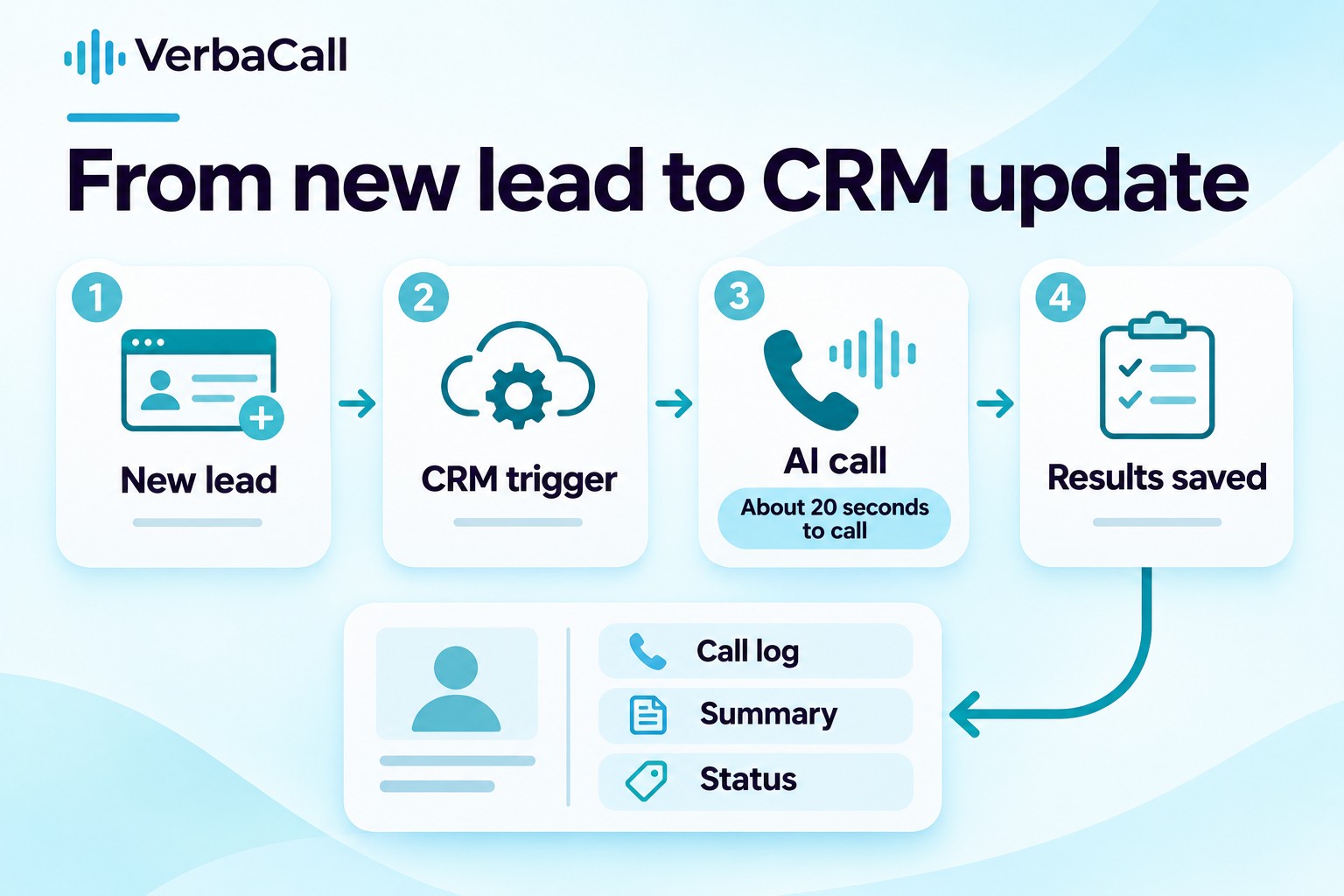
How a new CRM lead becomes a call, and how the outcome lands back in the record.
Which leads should trigger a call?
Two groups of leads should trigger a call, and each is handled differently.
New leads
- Call as soon as they arrive, inside your calling hours
- Limit the trigger to sources where speed decides the outcome, such as portals and ad forms
- Leave referrals and sphere contacts for a personal call
- Check that each source collects consent to be called
Existing leads
- Work them in batches as a planned campaign
- Filter by lead status and date, or by location, so the opener fits the group
- Use a lighter script that asks whether they are still looking
- Confirm consent before any automated call or text
Consent appears in both columns for a reason. The FCC treats AI-generated voices as artificial voices under the TCPA, so outbound AI calls require the called person’s prior consent. (Federal Communications Commission) The TCPA guide for real estate explains what to check.
How do you avoid double contact?
By deciding who speaks first, then turning off everything else for the first hour.
Before you switch it on
- List every automation in the CRM that fires on a new lead
- Pause or delay the ones that text or email in the first hour
- Make sure an opt-out in either system reaches the other
- Create a test lead with your own number and count how many messages you get
- Review the first 20 real calls and the notes they produced
See it on your CRM Book a demo and ask to see the connection for the CRM you use, including what gets written to a contact. Book a demo
What makes a connection worth trusting?
It is boring. Leads arrive, calls go out, notes appear, and nobody has to check whether it worked. You get there with a careful first week and a short weekly review after that.
If you are still choosing a product, our comparison of AI voice agents for real estate shows which options work with which CRMs.
Connect once, call every new lead Try VerbaCall free with 30 minutes of call time, or book a demo on your CRM. Book a demo or Try for free
Frequently asked questions
Does VerbaCall integrate with Lofty?
Yes. Lofty is one of VerbaCall’s live CRM connections, alongside kvCORE/BoldTrail, CINC, Cloze, and Follow Up Boss.
Can I use an AI voice agent if my CRM already has an AI assistant?
Yes. Check what the built-in assistant covers first. Lofty’s product page, for example, describes a Sales Agent that qualifies leads and books appointments, without stating whether it handles phone calls. (Lofty) If it does not, a voice agent fills that gap. Give each tool a clear job so they do not overlap.
What if my CRM is not on the list?
VerbaCall also connects to HubSpot, Salesforce, Zoho, and Pipedrive, has an API, and adds connectors on request. Ask about your CRM in a demo before you commit to anything.
Will the AI agent create duplicate contacts?
It should not when it reads from and writes to the existing record. Duplicates usually come from a second lead source feeding the same person in. Test with a contact that already exists and check the result.
How long does a CRM connection take to set up?
The connection itself is usually a sign-in and a few settings. The time goes into deciding which leads to call and reviewing the first calls. Allow a week of close listening before you leave it alone.
Sources
- Lofty, accessed November 2026. Product overview
- Federal Communications Commission, February 2024. FCC Confirms TCPA Applies to AI Technologies That Generate Human Voices
- Harvard Business Review, March 2011. The Short Life of Online Sales Leads
About VerbaCall. VerbaCall is an AI voice agent platform. It calls new leads within about 20 seconds, answers inbound calls at any hour, books appointments, and warm-transfers ready callers to your team. Each conversation is written back to your CRM, with text and email follow-up alongside. It is built on Twilio and serves US businesses in real estate, senior living, home care, healthcare, and restaurants. See VerbaCall for realtors.